
Download DreamDiary – free Mac dream‑journal app, secure and easy to use
Overview – Why DreamDiary Stands Out
DreamDiary is a lightweight, free Mac software that lets you capture, organize, and revisit your nightly visions with a few clicks. Designed for the curious mind, this science‑and‑education tool treats each dream like a data point, giving you the ability to tag, date‑stamp, and search entries for patterns that may reveal subconscious insights. Although its first release dates back to the early 2000s, DreamDiary remains relevant thanks to a clean interface that runs smoothly on modern macOS versions while still supporting legacy Mac OS X builds.
The program’s playful subcategory “Funny Things” reflects its approachable design – you won’t need a PhD in psychology to start logging dreams; a simple text entry field is enough. Since joining the curated software list in 2006, DreamDiary has accumulated over 4,000 downloads, with a strong user base in Australia and the United Kingdom. Its modest file size (under 5 MB) means it won’t hog storage or slow down your system, a rare quality among journaling apps that often bundle heavy analytics modules.
Updated most recently on July 14 2006 (version 2.0), the app is stable, free of intrusive ads, and fully English‑only, which simplifies the user experience for a global audience. Whether you’re a seasoned lucid‑dreamer, a psychology student, or simply someone who enjoys reflecting on nightly adventures, DreamDiary offers a secure, no‑frills environment for chronicling the intangible. The app’s emphasis on privacy—your entries stay on your Mac unless you choose to export—aligns with today’s data‑security expectations, making it a trustworthy companion for nightly reflection.
Key Features That Make DreamDiary Unique
- Simple Text Entry: A clean, distraction‑free editor lets you type dream details in seconds.
- Automatic Date & Time Stamp: Every entry records the exact night, helping you spot chronological trends.
- Tagging System: Add custom tags (e.g., “lucid”, “nightmare”, “symbol”) for fast filtering and thematic analysis.
- Searchable Archive: Full‑text search across all entries, with instant results on macOS.
- Export Options: Export your journal to plain‑text or PDF for backup or sharing with a therapist.
- Lightweight Design: Under 5 MB installer, minimal RAM usage, perfect for older Macs.
- Secure Local Storage: All data stays on your device; no cloud sync unless you manually enable it.
- Customizable Themes: Choose light or dark mode to match your macOS appearance.
- Multilingual Ready (Future‑Proof): Though currently English‑only, the codebase supports easy localization.
- Free Forever: No hidden fees, no subscription, truly free software.
Step‑by‑Step Installation and First‑Run Guide
Installing DreamDiary is a straightforward process that even a non‑technical user can follow. First, download the installer from the official site – look for the “Download DreamDiary for Mac” button, which provides a .dmg file. Once the file finishes downloading, double‑click the .dmg to mount the disk image. A window will appear showing the DreamDiary app icon; simply drag it into your Applications folder. macOS may warn you that the app is from an unidentified developer; you can safely bypass this by opening System Preferences → Security & Privacy → General, then clicking “Open Anyway” for DreamDiary.
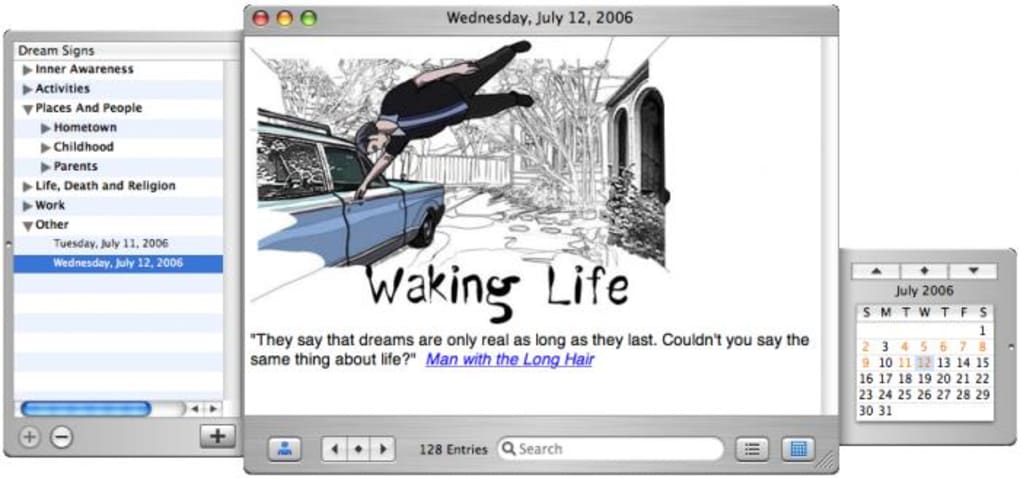
After copying the app, launch it from the Applications folder. The first run will prompt you to create a master journal file. Choose a location (the default Documents folder works well) and give the file a memorable name, such as “MyDreamJournal”. DreamDiary will automatically create the SQLite‑based database that stores all future entries. The main window presents a large text area at the top, a tag bar below, and a sidebar showing a chronological list of past entries.
To log a dream, click the “New Entry” button, type your narrative, add any relevant tags, and hit “Save”. The software instantly timestamps the entry and adds it to the archive. You can revisit any entry by selecting it from the sidebar or using the search box at the top right. For users who prefer keyboard shortcuts, DreamDiary supports Cmd + N for a new entry and Cmd + F to focus the search field.
Operating System Compatibility: DreamDiary runs on macOS 10.5 (Leopard) through the latest macOS releases, thanks to its minimal dependencies. The Mac OS X tag ensures search engines understand the platform focus. If you encounter any issues on newer macOS versions, a quick check for the latest patch on the developer’s website usually resolves compatibility quirks.
Pros, Cons and Frequently Asked Questions
Pros
- Completely free with no hidden charges.
- Very small download size; ideal for older Macs.
- Intuitive interface – perfect for beginners.
- Robust tagging and search capabilities.
- Secure local storage protects your private thoughts.
Cons
- Lacks cloud synchronization out of the box.
- No mobile companion app (iOS/Android) yet.
- English‑only interface limits non‑English speakers.
- Last official update was in 2006; may feel dated.
- Limited advanced analytics for dream pattern detection.
FAQ – DreamDiary (FAQPage)
Is DreamDiary really free?
Yes, DreamDiary is 100 % free. There are no hidden fees, no subscription, and no in‑app purchases. You can download, install, and use it forever without paying.
Can I sync my dream journal across multiple devices?
DreamDiary stores data locally on your Mac. If you want to sync, you can manually copy the journal file to a cloud folder (iCloud, Dropbox, etc.) and open it on another Mac with DreamDiary installed.
Is my dream data safe from prying eyes?
All entries are saved on your local drive only. DreamDiary does not transmit any data online, so your private thoughts remain private unless you choose to export or share them.
Will DreamDiary run on the latest macOS Ventura?
Yes. Although the last official update was in 2006, the app’s minimal system requirements mean it runs smoothly on macOS Ventura, Monterey, and earlier versions back to OS X 10.5.
Can I export my dreams for analysis elsewhere?
DreamDiary includes built‑in export to plain‑text (.txt) and PDF formats. This lets you back up your journal or import it into other analysis tools.
Conclusion – Download DreamDiary Today
If you’ve ever woken up with a vivid story that slipped away before you could write it down, DreamDiary offers a simple, secure, and completely free solution for Mac users. Its lightweight footprint, intuitive tagging system, and robust search make it a reliable companion for anyone interested in tracking their subconscious adventures. While the lack of native cloud sync and an English‑only interface may deter a few, the core experience remains strong: a distraction‑free space where your dreams stay yours.
Ready to start your nightly log? Click the download button below, follow the quick installation steps, and begin capturing dreams tonight. Remember, the best insights come from consistency – the more you write, the richer the patterns you’ll uncover.







